


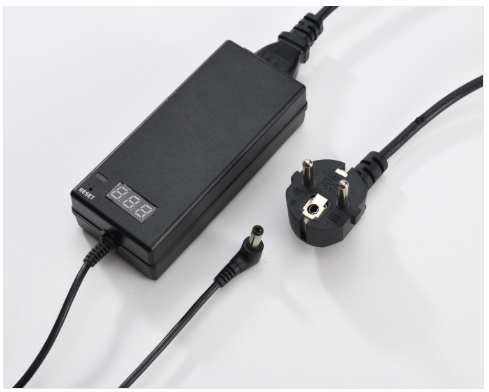
Using an Adjustable Power Adapter safely comes down to matching the output voltage exactly to your device's requirement, checking polarity before connecting, and never exceeding the adapter's rated current. Get these three things right, and a variable adapter—like the HJ-0610-YK, adjustable from 7.5V to 15V at up to 5A—can safely power everything from smartphones and routers to LED strips and prototyping boards.
What You'll Need
The Adjustable Power Adapter itself, with its digital display and remote control (if included)
The correct DC connector tip for your device, if the adapter uses interchangeable tips
Your device's voltage and current rating, usually printed on a label or in the manual
Step 1: Check Your Device's Required Voltage And Current
Before touching the adapter, find the voltage and current rating printed on the device itself or in its documentation—usually written as something like "5V 2A" or "12V 3A." This number is non-negotiable: setting the adapter's output too high can damage the device, while setting it too low may cause it to malfunction or fail to power on at all.
Step 2: Set The Output Voltage On The Adapter
Using the digital display and remote control (on models like the HJ-0610-YK), adjust the output in small increments—typically 0.5V steps—until it matches your device's required voltage exactly. Confirm the reading on the display before moving to the next step; don't estimate by feel.
Step 3: Confirm Polarity Before Connecting
Most DC devices are center-positive, but not all are—reversing polarity can damage sensitive electronics instantly. Check the polarity symbol on both the adapter's connector and the device's power port, and make sure they match before plugging in.
Step 4: Power On And Monitor The Display
Once connected, power on the adapter and watch the digital display for a few seconds. A stable voltage reading with no unusual current spikes is a good sign. If the display fluctuates significantly or the adapter's built-in protection cuts the power, disconnect and recheck your voltage setting and connections before trying again.
Common Mistakes To Avoid
Guessing the voltage instead of checking the label — even a small overshoot can damage sensitive components like LEDs or microcontrollers.
Ignoring the current rating — matching voltage isn't enough; make sure the adapter can supply enough current (amps) for your device, especially under load.
Skipping the polarity check — this is one of the fastest ways to damage a device, and it's easy to overlook when swapping between multiple devices.
Leaving it unattended on first use — always observe the first few minutes of operation for a new device or a new voltage setting, in case something is misconfigured.
Safety Features Worth Checking For
A well-built adjustable power adapter should include over-current protection, over-voltage protection, short-circuit protection, and over-temperature protection—these safeguards cut power automatically before a wiring mistake or an unexpected fault causes real damage. Avoid uncertified, no-name adapters that skip these protections, especially if you're using the adapter across many different devices where mistakes are more likely.
Where This Comes In Handy
Following these steps matters most in situations where the same adapter is used across many different devices—electronics prototyping and testing, IT and computer repair, consumer electronics troubleshooting, network equipment field testing, and STEM classrooms where students are working with a range of components. In all of these settings, a single adjustable adapter used carefully can safely replace a shelf full of fixed-voltage power supplies.
If you're sourcing Adjustable Power Adapters for a repair shop, lab, or classroom setting, sharing your typical voltage range and device types can help confirm the right adapter model and output configuration.